
Every week there is a new model, a new agent framework and a new post telling you your job is gone by next spring. On top of that, the actual job: tickets, reviews, a pipeline that went red. I noticed I was sitting through whole days with my shoulders somewhere near my ears and breathing like I was holding it for later.
The fix is not a secret. A few minutes of breathing and stretching a day make a real difference, and everybody knows it. The problem is that nobody does it.
No app, no excuse
I tried the phone route. You open the breathing app, a notification pops up, and five minutes later you are reading something that makes you tense again. The phone is the last device you want to reach for when you want to switch off.
So I put the break where I already am all day: the terminal.
npm install -g @m1well/brb
brb
That starts a small static server on localhost:7878 and opens a browser tab
with the start screen. Your terminal is not blocked, and the server stays up for
30 minutes of inactivity so the next break opens instantly. No account, no
network, no audio files. The figures are SVG and every sound is synthesised in
the browser.
What a break looks like
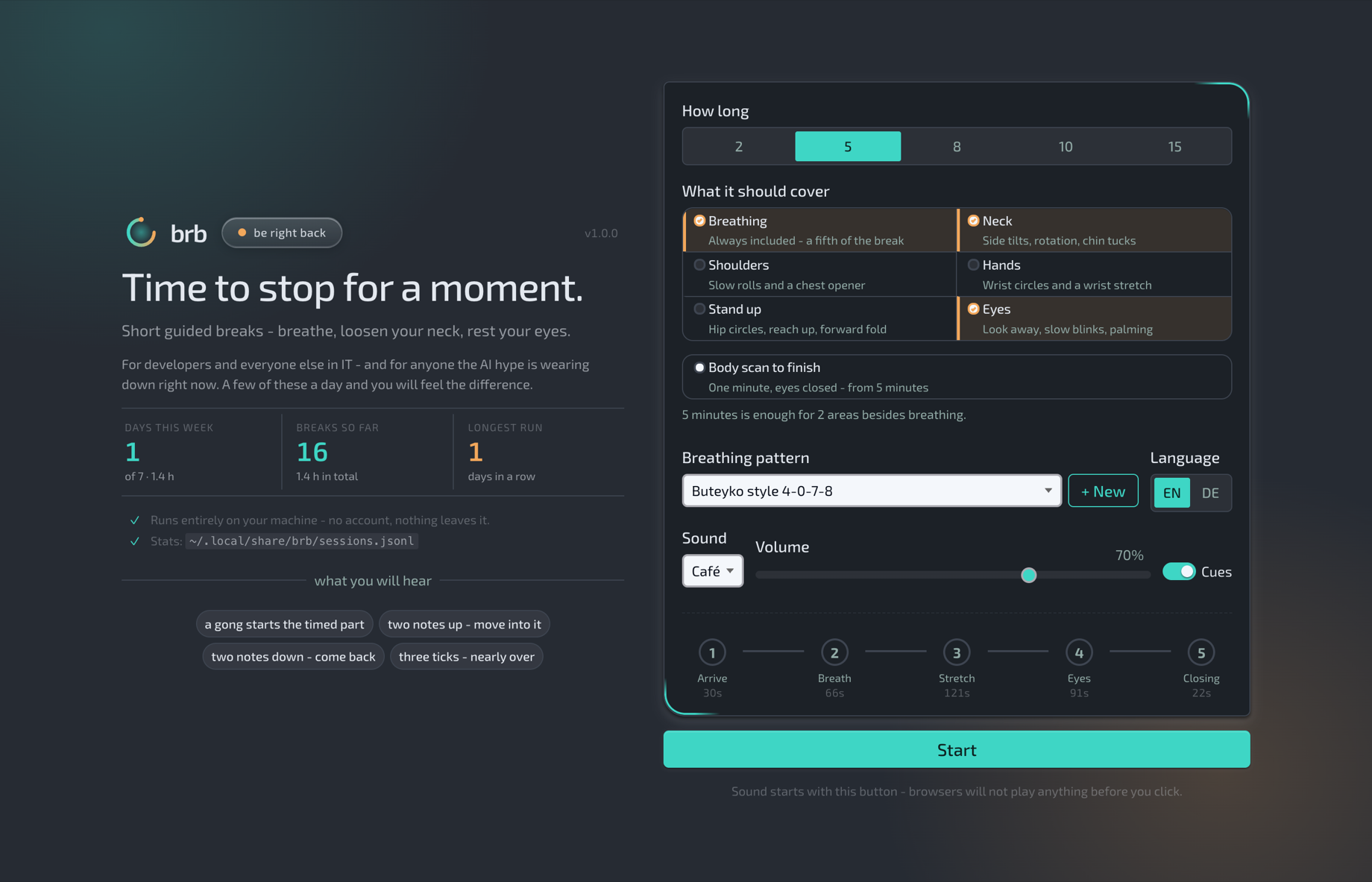
On the start screen you pick a length - 2, 5, 8, 10 or 15 minutes - and what it should cover besides breathing: neck, shoulders, hands, standing up or eyes. The longer the break, the more areas fit in, and brb tells you how many. From 5 minutes on you can add a one-minute body scan at the end.
Breathing is part of every break, at least a fifth of it. There are seven patterns built in, from a calm coherent 6-6 to box breathing and 4-7-8, and you can add your own with seconds for in, hold, out and hold empty. The one you pick becomes the default for next time.
The exercises themselves are what you would do if someone reminded you: side tilts and chin tucks for the neck, shoulder rolls and a chest opener, wrist circles for the hands that live on a keyboard, a forward fold when you stand up, and for the eyes looking into the distance, slow blinks and palming. Each one runs at its own fixed length, and whatever time is left goes to breathing, so the break ends on time and not “roughly”.
In the background you get café noise (voices you cannot make out, dishes, an espresso machine) or rain, or nothing. Short cue tones tell you when to move and when to come back, so you can keep your eyes closed.
If you tend to cheat, brb --strict locks the skip button for the first minute.
Stats that stay on your machine
Every break is appended to ~/.local/share/brb/sessions.jsonl, one JSON line
per session. The start screen shows days this week, breaks so far and your
longest run, and brb stats prints the same thing plus a 13 week heatmap in the
terminal. Nothing is uploaded anywhere. Delete the file and the stats are gone.
Settings work the same way: everything is saved as you change it, in a plain JSON file next to the sessions. No config to edit by hand.
Five minutes, every day
brb will not fix the hype and it will not close your tickets. But five minutes of breathing and moving before the next meeting is five minutes where your shoulders come down and your head clears. Build it into your routine: after lunch, before a review, whenever the fifth AI announcement of the day hits your feed.
The code is on GitHub. Type brb, and I will
see you in a bit.