
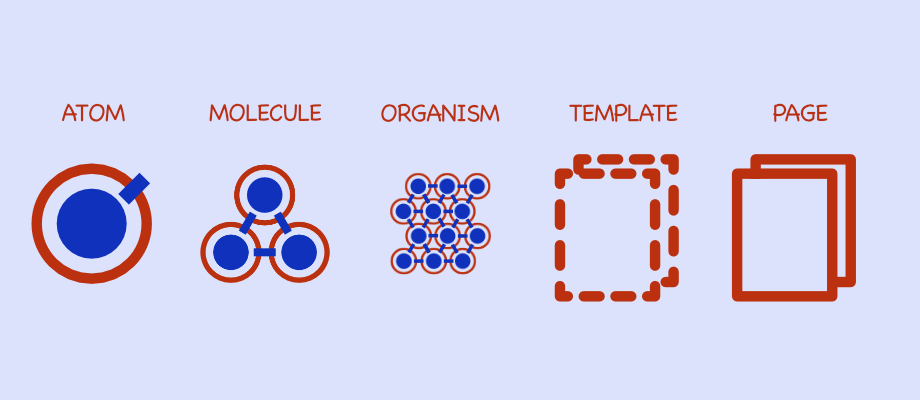
The backend hands you a structure to hold on to. Spring Boot has layers, and everyone on the team knows roughly where a new class belongs. The frontend does not give you that for free. Six months into a project you are looking at a shared folder with 50 unrelated components, a components directory where dumb UI sits next to business logic, and stylesheets nobody wants to refactor.
What fixed that for me came out of high school chemistry. Atomic Design, a methodology from Brad Frost, treats the interface as a hierarchy of components instead of a pile of pages. You can work on a single input field and still keep in view what it does to the login screen it ends up in.
Here it is on an Angular login screen, v19 or later.
The periodic table of Angular components
Atoms combine into molecules, molecules into organisms. Frost splits the UI into five levels: atoms, molecules, organisms, templates and pages.
1. Atoms
In chemistry an atom is the smallest piece with distinct properties, and on its own it does not do much.
In Angular, atoms are your dumb presentation components. No business logic, no
injected services, only input() for configuration and output() for events.
For a login screen the atom is not the login form. It is the UiInputAtom, the UiButtonAtom, the UiLabelAtom. Input atoms usually implement ControlValueAccessor so they plug into Angular Forms.
@Component({
  selector: "app-ui-button-atom",
  template: `
    <button
      [disabled]="disabled()"
      (click)="clicked.emit($event)"
      class="base-btn {{ variant() }}"
    >
      <ng-content />
    </button>
  `,
})
export class UiButtonAtom {
  // Modern signal-based inputs
  disabled = input(false);
  variant = input<"primary" | "secondary">("primary");
  clicked = output<MouseEvent>();
}
This component knows nothing about logging in. It knows how to be a button.
2. Molecules
Two hydrogen atoms bond with an oxygen atom and you get water, which behaves like neither of them.
Molecules are atoms bonded into a unit with a single responsibility. UI logic is allowed here, toggling password visibility for example. Backend calls are not.
A raw input field is rarely used alone. Our molecule is the PasswordFieldMolecule, built from a UiLabelAtom, a UiInputAtom with type=“password” and a generic UiErrorAtom for validation messages. The label gives the input meaning, the error atom reports on it, and the result drops into any screen that needs a password.
3. Organisms
Organisms are molecules and atoms joined into a distinct section of the interface. This is usually the first smart level, the first one that knows about a business context.
Ours is the LoginFormOrganism: an EmailFieldMolecule, a PasswordFieldMolecule and a LoginActionsMolecule with the submit button and the forgot-password link. It owns the FormGroup through typed reactive forms and it captures the user’s intent. Then it stops. The HTTP request is not its job, so it emits a typed loginPayload event and leaves the network to whoever sits above it.
@Component({
  selector: "app-login-form-organism",
  imports: [EmailFieldMolecule, PasswordFieldMolecule, ReactiveFormsModule],
  template: `
    <form [formGroup]="loginForm" (ngSubmit)="onSubmit()">
      <app-email-field-molecule [control]="loginForm.controls.email" />
      <app-password-field-molecule [control]="loginForm.controls.password" />
      @if (loginError()) {
        <app-ui-alert-atom type="error">Invalid credentials</app-ui-alert-atom>
      }
      <app-ui-button-atom type="submit">Log In</app-ui-button-atom>
    </form>
  `,
})
export class LoginFormOrganism {
  login = output<LoginCredentials>();
  loginError = input<string | null>(null);
  // ... Form logic setup
}
4. Templates
The chemistry analogy runs out here. Templates are page-level objects that place components into a layout.
The AuthLayoutTemplate defines the skeleton: logo on the left, a centered card for content on the right, footer at the bottom. It holds the actual organisms through content projection, ng-content or router-outlet, and it is where the design system puts its guardrails.
5. Pages
Pages are concrete instances of templates, and a page is what your route points at.
The LoginPageComponent injects the AuthService, uses the AuthLayoutTemplate, places the LoginFormOrganism inside it, listens for the (login) event and fires the HTTP call.
Because the logic lives there, you can test the page for integration and the organism for form behaviour, separately.
Signals, standalone and the new control flow
Angular 19 makes this a lot cheaper to implement than it used to be.
Standalone components kill the SharedModule that every atom used to live in. An
organism imports the molecules it needs, imports: [ UiButtonAtom ], which
makes the dependency graph readable and tree-shaking effective.
@if and @for take the noise out of templates compared to *ngIf, and that
pays off most in molecules and organisms where the markup is densest.
Signals make state at the atom level trivial. Change detection gets cheaper too, because updating one atom’s signal does not force a walk through the whole organism tree.
Where it goes wrong
Five mistakes I keep running into:
- Dumping every component into one shared folder. It flattens the hierarchy and makes anything impossible to find. Use explicit directories, /atoms and /molecules.
- Naming a low-level component LoginInputComponent. That ties it to a context it does not belong to and nobody reuses it in the next feature. Name it for what it does: UiInputAtom.
- Injecting a service into an atom or a molecule. There goes their purity and
with it their reusability. Keep those layers on
input()andoutput(). - Putting an organism inside a molecule. It inverts the hierarchy and tangles the dependency graph. The direction is fixed: Page → Template → Organism → Molecule → Atom.
- Copy-pasting a whole LoginFormOrganism to build a registration form. Pull the shared parts into a molecule, a UserCredentialsMolecule for instance, and compose them differently.
Enforcing it with Nx
In a large team or a monorepo, all of this relies on discipline, and discipline scales poorly. Nx lets you make the boundaries physical. Instead of folders you get lightweight libraries:
- libs/ui/atoms (Tag: type:atom)
- libs/ui/molecules (Tag: type:molecule)
- libs/features/auth (Tag: type:feature)
Nx ships an ESLint rule for it, @nx/enforce-module-boundaries. You write the constraints the same way you would write ArchUnit rules in a Spring Boot project, and a violation breaks the build:
- Atoms import nothing.
- Molecules import atoms.
- Organisms import molecules and atoms.
- Features import organisms.
Import the AuthService into a UiButtonAtom and CI stops you. That is the difference between a convention and a rule.